Configuration
monodocs reads an optional monodocs.config.yml to control how your files are bundled into a single HTML. Without one, the defaults below apply.
Where the config file lives
monodocs resolves the config file in this order:
- The path passed to
-c, --config <file>. monodocs.config.ymlinside the input directory (when you pass an input argument, e.g.monodocs build ./docs). For a single-file argument, its directory is used, somonodocs build ./docs/plan.mdreads the same file asmonodocs build ./docs.monodocs.config.ymlin the current working directory (when no input argument is given).
An explicit --config file that does not exist fails the build. Relative paths inside the config (input, output.path) resolve against the config file's location, not the current directory.
# Auto-detect ./docs/monodocs.config.yml
monodocs build ./docs

# Use an explicit config file
monodocs build -c ./monodocs.config.yml
Unknown keys
Every key is checked at every depth. An unrecognized one fails the build, naming the key and the object that holds it, so a typo cannot be silently ignored:
error: Invalid config file ./monodocs.config.yml: pdf: Unrecognized key: "footr"This holds at the top level too: a key introduced in a later release must be removed until you upgrade.
Precedence
Settings are merged in this order, highest first:
CLI options › config file › defaults
-o, --config, and -f on the command line always win. Only output.path/-o, output.format/-f, and input/<input arg> are settable on the CLI; everything else is config-file only.
Full example
Every key is optional. This example lists them all with their default values:
# Document title shown in the output HTML
title: Documentation

# Language of the generated document. Fills <html lang> and selects the UI labels (en, ja).
# Any BCP 47 tag. This is not the language of the CLI's own messages.
lang: en

# What to do when the machine running the build lacks a font the document needs.
# Covers PDF output and mermaid pre-render alike, which is why it is top level.
fontCheck: warn # warn | error | off

# What the document says about itself. Every field is optional and none is interpreted:
# the date is not parsed and the version is not compared to anything. Unset by default.
# document:
#   version: "1.2"
#   date: "2026-08-22"
#   authors: [Documentation Team]

# Input directory (overridden by the CLI input argument)
input: ./docs

# What every relative path resolves against. Defaults to input's value.
# Write it, with sources.include, to build one document from more than one directory.
# root: "."

output:
  format: html # html | pdf | both
  path: ./dist/docs.html

sources:
  markdown:
    extensions: [.md, .markdown]
  asciidoc:
    extensions: [.adoc, .asciidoc, .asc]
  # Glob patterns, relative to root, selecting what may become a page. Unset, everything under
  # root is a candidate. exclude subtracts from this, and subtracts last.
  # include: [README.md, docs/**]
  # Glob patterns that are never turned into pages. Added to the built-in list below, not
  # replacing it: ['_partials/**', 'partials/**', 'includes/**', '**/_*']
  # exclude: [drafts/**]
  # Set false to bundle the fragments that built-in list keeps out
  excludeDefaults: true
  # What a newline inside a paragraph becomes: space (default) / break / join
  lineBreak: space

sidebar:
  # "folder" (default) builds the sidebar from the directory structure; "custom" uses the items below
  mode: folder
  # Sidebar definition for mode: custom (each entry has either path or children)
  # items:
  #   - title: Home
  #     path: index.md
  #   - title: Setup
  #     children:
  #       - path: setup/install.adoc
  # Collapse directories deeper than this level by default. Unset by default = all expanded; 0 = collapse all
  # collapseDepth: 2
  # Take the navigation title from "heading" (default) or "filename"
  titleFrom: heading
  # Pull a single-page folder's only page up to its parent
  flattenSingleChild: false
  # Transform derived display titles (never the explicit frontmatter / :sd-title: title)
  titleTransform:
    page: { type: none } # none | stripNumberPrefix | regex
    directory: { type: none }

toc:
  # Deepest heading level shown in the in-page table of contents (2–6)
  maxLevel: 3

numbering:
  sections: false # false, or the deepest heading level numbered (2–6)

figures:
  align: center # left | center | right; an AsciiDoc align= wins

assets:
  embedImages: true
  maxInlineSize: 5MB # "500KB", "5MB", or a raw byte count
  onLargeImage: warn # warn | error | external
  # budget: 10MB # unset by default; say so when an output exceeds it
  onBudget: warn # warn | error

mermaid:
  enabled: true
  mode: client # client | pre-render
  runtime: inline # inline | cdn (client mode only)

highlight:
  enabled: true

math:
  enabled: true

html:
  theme: default
  colorScheme: light # light | dark | auto (follows the OS setting)
  contentWidth: 860px # a CSS length, or "full" for the full available width
  contentWidthToggle: true # show the standard/wide toggle
  contentWidthDefault: standard # standard | wide (used until the reader chooses)
  diffViewDefault: side-by-side # side-by-side | inline | current | earlier (a build with a difference)
  imageLightbox: true # click unlinked, non-decorative content images and Mermaid diagrams to enlarge them
  # labels: # replace individual UI labels from the table lang selects
  #   tocTitle: In this article

pdf:
  pageSize: A4
  margin: { top: 20mm, right: 15mm, bottom: 20mm, left: 15mm }
  printBackground: true
  density: normal # relaxed | normal | compact | tight, or an object (see below)
  bookmarks: true # folder -> page outline, same structure as the HTML sidebar
  header: false # false, or an HTML fragment using Chromium's classes
  footer: '<div style="width:100%;margin:0 15pt;font-family:sans-serif;font-size:8pt;color:#666;text-align:center;"><span class="pageNumber"></span> / <span class="totalPages"></span></div>'
  cover:
    enabled: false # true generates a cover from title and document
  watermark: false # false, or one line of text printed behind every sheet
  toc:
    enabled: false # true prints a table of contents with page numbers in front of the body
    depth: 2 # deepest heading level listed (2–6)
Reference
Top level
| Key | Type | Default | Description |
|---|---|---|---|
title | string | Documentation | Title shown in the output HTML (<title> and header). |
lang | string | en | Language of the generated document. Fills <html lang> and selects the UI labels. See below. |
fontCheck | warn error off | warn | What to do when the build machine lacks a font the document needs. See below. |
input | string | ./docs | Input path to scan: a directory, or a single source file. The CLI input argument overrides this. Relative to the config file. |
root | string | value of input | The directory every relative path resolves against: routes, images, include::, and the config file. See below. |
document | object | unset | What the document says about itself: version, date, authors. See below. |
root (building one document from more than one directory)
To build a repository's top-level README.md and its docs/ pages as one document, keep a single root and select what goes in. There is one root because it answers four questions at once: where monodocs.config.yml is looked for, what a route is relative to, which directory an image may be read from, and how far an AsciiDoc include:: may reach.
root: "."
sources:
  include:
    - "README.md"
- "docs/**"rootdefaults toinput's value, soinput: ./docsalone meansroot: ./docswith everything under it included.- Routes come from the path relative to
root. AddingREADME.mdto adocs/tree therefore changes the route of every page in it:docs/index.mdbecomes/docsrather than/. - Write
inputandroottogether only when they name the same directory. Anything else is a configuration error, including aninputthat points insideroot. This covers the command line too:monodocs build ./docsagainst a configuration that setsroot: "."stops rather than picking one. - Written without
input,rootis what the build is pointed at, rather than the default./docs.rootmust name a directory, not a file.
NOTE
The built-in exclude patterns are anchored at the root. _partials/** matches only a directory at the top of the root, so under root: "." a docs/_partials/ is not matched; name it in sources.exclude to leave it out. A file whose own name starts with _ is still matched at any depth by **/_*.
document (what the document says about itself)
Records the document's version, date, and authors, so a reader can tell which version they hold and when it was true.
title: Internal Documentation
document:
  version: "1.2"
  date: "2026-08-22"
  authors:
- Documentation Team| Key | Type | Description |
|---|---|---|
version | string | Version of the document. Not compared to anything. |
date | string | Date as you write it. Not parsed into a calendar. |
authors | string[] | The people responsible for the document. |
Every field is optional and is a string monodocs does not interpret. It only trims surrounding space, so a whitespace-only value counts as unset. The values appear in exactly three places:
- The footer at the end of the HTML and the PDF, as one line:
Version 1.2 · 2026-08-22 · Documentation Team. The wordVersionis a UI label, and can be replaced throughhtml.labels - The PDF's document properties: the authors become
Author, the version and date becomeSubject, and both values as you wrote them becomeKeywords - The PDF cover, under the
title, whenpdf.coveris enabled
title stays at the top level rather than moving in here.
NOTE
The build stamps no date of its own: a date in the output is a date you wrote. To show the build date, set document.date from your workflow.
lang (document language and UI labels)
lang sets the document's language: it fills <html lang>, which browsers, screen readers, and Chromium's font selection for the PDF read, and selects the label table for the UI monodocs wraps around the pages (the search box, On this page, No results, Copy, the lightbox controls, prev/next, the footer, the PDF's cover and contents, and the difference from an earlier version).
lang: ja- Any syntactically valid BCP 47 tag is accepted. A string that is not one is rejected rather than written into the attribute.
- Label tables ship for
en(the default) andjaonly, matched case-insensitively on the primary language subtag, soen-GB,ja-JP, andJAall find one. Any other tag still reaches<html lang>, falls back to the English labels, and warns once naming the tag (lang/no-label-table). Usehtml.labelsto supply the wording. - The branding footer's
Generated bystays English underlang: ja. Unlesshtml.labelssetsgeneratedBy, the default template marks that linelang="en"so a screen reader reads it as English; a custom template gets the mark only where it keeps{{generatorAttrs}}.
IMPORTANT
From 0.17.2 to 0.18, the UI labels were English whatever lang said. From 0.19.0, lang: ja shows Japanese labels again, as it did until 0.17.1, except Generated by. A configuration that copied the Japanese labels into html.labels keeps working, and can drop them. It keeps the 生成: footer while it sets generatedBy: drop at least that entry for the 0.19.0 footer.
NOTE
lang is not the language of the CLI's own messages. The build log does not change language with the document.
fontCheck (missing fonts)
The output is composed with the build machine's fonts, and a character with no font becomes tofu (□ / ☒) permanently, in every copy. Japanese text needs a CJK font and emoji need an emoji font; a CI runner may have neither.
fontCheck: warn # warn (default) | error | offwarnnames the characters at risk and keeps building.errorexits non-zero, and no PDF is written.offdoes not measure at all.
WARNING
With --format both the HTML is written before the PDF is printed, so error leaves that HTML in place, and a PDF from an earlier build where it is. Clean the output directory if a pipeline reads it.
The check runs where the fonts are decided:
- PDF output, in the browser already open to print it, so it costs no extra startup.
mermaid.mode: pre-render, which bakes diagram text measured with the build machine's fonts into the SVG, so a missing font affects the HTML as much as the PDF. That is why this key is top level rather than underpdf.
Plain HTML output is not measured: it is drawn with the reader's fonts.
The report names the characters, with an example of a font that covers them:
warning: No font on the machine running this build draws 2 character(s) this document uses, so they
come out as tofu (□ / ☒) in the PDF — permanently, in every copy of it. At risk: 日 (U+65E5, e.g.
Noto Sans CJK); ✅ (U+2705, e.g. Noto Color Emoji). Install a font that covers them …
The example is a font face, not a package, since packages differ across platforms. On Debian and Ubuntu the usual answer is fonts-noto-cjk and fonts-noto-color-emoji; the CI guide installs both.
What it does and does not see:
- Only what will be drawn is measured. The sidebar, the table of contents, and the search results are hidden when printing, so a character that appears only there is not reported. Hidden means
display: none,content-visibility: hidden, orvisibility: hidden. - The unit is the grapheme cluster, with the font of its element, so a variation sequence or an emoji ZWJ sequence is judged as drawn, not as separate codepoints. A long list is cut short with a count of the rest.
- It is a heuristic over the browser's font fallback: each cluster is compared against a private-use codepoint no font is expected to draw, and a hit is confirmed by rasterising it. So
warnis the default, and choosingerroraccepts that a false positive stops CI too. - It checks its own reference against a second private-use codepoint and a noncharacter. If this machine draws something that should have no glyph, the check says so and reports no missing characters. The MATH table check does not rest on that reference, so it is still reported, and still stops the build under
error. If the check reaches its inspection limit on a very large document before the end, it says so rather than reporting a clean result. - The default page-number footer is measured too. A replacement
pdf.header/pdf.footerfragment is not: it is arbitrary HTML that brings a font of its own. - Formulas are measured as drawn. A PDF sets them in the math font monodocs carries (see
math), so a machine without a math font of its own reports nothing of them. A theme that names its own font formathsets them in that font instead, and then: a single-letter variable is drawn as a mathematical italic letter (xas𝑥, U+1D465), so that letter is reported when neither that font nor the machine's other fonts draw it, althoughxitself draws; and a font without an OpenType MATH table, without which brackets, braces and radicals do not stretch, is reported asfont/no-math-table, under the samewarn,errorandoff. Undermermaid.mode: pre-render, a label's formula in the SVG the HTML carries is laid out in this machine's fonts, so its letters are reported as before; the PDF gets a copy of the diagram laid out in the carried font, of which only what that font lacks too, such as Japanese in\text{}, is reported: in a message that says it is the PDF's when the build writes a PDF alone, and otherwise by the PDF's own check.
output
| Key | Type | Default | Description |
|---|---|---|---|
output.format | html pdf both | html | Output format. Overridden by -f, --format. |
output.path | string | ./dist/docs.html | Output file path. Overridden by -o, --output. Relative to the config file. |
sources
Controls which file extensions are treated as Markdown vs. AsciiDoc, and which files are left out of the bundle entirely.
| Key | Type | Default | Description |
|---|---|---|---|
sources.markdown.extensions | string[] | [.md, .markdown] | Extensions rendered as Markdown. |
sources.asciidoc.extensions | string[] | [.adoc, .asciidoc, .asc] | Extensions rendered as AsciiDoc. |
sources.asciidoc.attributes | object | unset | Asciidoctor attributes set as defaults, not locks: a document that sets its own wins. See below. |
sources.include | string[] | unset | Glob patterns, relative to root, selecting what may become a page. Unset, everything under root is a candidate. sources.exclude subtracts from this, and subtracts last. A negated pattern (!…) is refused in both lists: patterns are combined with OR, so a negated one matches almost every path. |
sources.exclude | string[] | [] | Glob patterns, matched against the path relative to root, whose matches are never turned into pages. Added to the built-in list, not replacing it. |
sources.excludeDefaults | boolean | true | Whether the built-in list applies. Set false for a tree that really does bundle its _-prefixed files. |
sources.lineBreak | string | space | What a newline inside a paragraph becomes, in Markdown and AsciiDoc alike. space leaves it as CommonMark and Asciidoctor do (the browser shows a space). break turns it into a <br>; in AsciiDoc this sets hardbreaks-option as a default, so a document that writes :hardbreaks-option!: keeps its own lines joined. join removes it between two East Asian characters (East_Asian_Width F, W, or H, neither Hangul), so in any browser and in the PDF there is no space where a Japanese sentence ends on such a character and the next begins with one. Elsewhere the newline stays — next to a Latin letter or digit (a footnote reference such as [^1] included), next to an ambiguous-width character such as … or →, and next to inline code or an image. break leaves headings alone, and neither value changes the contents of pre and code. The search index follows the same value. |
The built-in list is ['_partials/**', 'partials/**', 'includes/**', '**/_*'], the paths that hold include fragments rather than pages. sources.exclude adds to it, so excluding one draft does not bring every fragment back:
sources:
  exclude: [drafts/**] # kept out, and so are _partials/** and the rest
A file named directly on the command line (monodocs build ./docs/_draft.md) is bundled whatever the patterns say. The patterns only decide what a directory scan picks up.
NOTE
sidebar.exclude was the earlier home for sources.exclude. It still works and behaves the same way (merged rather than replacing), but warns: a match is left out of the bundle, not just out of the navigation.
sources.asciidoc.attributes (values a document set shares)
Sets Asciidoctor attributes for every AsciiDoc file, such as :sectnums: without repeating it in each file, or a value shared across files (a product name, a release, a customer).
sources:
  asciidoc:
    attributes:
      sectnums: true
      product: "Widget"
      release: "7.2"
An attribute set here is a default, not a lock (the opposite of Asciidoctor's API default), so a document that sets its own wins:
= Release notes
:product: Gadget

Shipping {product}.   // Gadget, not Widget
A document turns one off for itself the same way, with :sectnums!:.
sectnums numbers each file on its own and restarts in the next. To number the whole document as one, use numbering.sections instead; while it is on, sectnums is refused.
The contents are classified rather than passed through, because some attributes move the boundary monodocs relies on:
- Allowed, and settable per build: presentational and structural attributes such as
sectnums,sectnumlevels,experimental,idprefix,idseparator,tabsize,toclevels. - Author-defined: any name monodocs does not hold back, recognised by shape rather than enumerated.
- Refused, naming the attribute and why:
allow-uri-read,docinfo,backend,data-uri,imagesdir,source-highlighter, and thesd-*namespace, which belongs to monodocs.allow-uri-readletsinclude::fetch a URL, turning a build into an HTTP client, and safe mode does not stop it, since it is the very attribute safe mode consults. - Not accepted at all:
safeandbase_dir, which are the sandbox;docdir,docfile,docname,docfilesuffix, andoutdir, which decide where a path resolves;outfilesuffixandrelfilesuffix, which decide what a cross-reference looks like and so whether it can be turned into a hash route; andshowtitle, which the page title, the heading list, and every element ID are built from.
An attribute name must be written bare: lower-case letters, digits, underscores, and hyphens. A name carrying @ or ! is refused, because Asciidoctor would read it as a soft set or an unset and the attribute would bypass the classification above.
Unsetting is not offered (a value of false, or a name ending in !, is refused); a document unsets an attribute for itself. A value ending in @ is refused too: that is Asciidoctor's marker for an attribute the document may override, and monodocs already adds it to every value here.
NOTE
Markdown has no equivalent: substituting a vars: map into Markdown text would be a template language. Write the pages that need shared values in AsciiDoc.
sidebar
| Key | Type | Default | Description |
|---|---|---|---|
sidebar.mode | folder custom | folder | How the sidebar is built. folder derives it from the directory structure. custom uses sidebar.items exactly as written. See below. |
sidebar.items | object[] | unset | The sidebar definition for mode: custom. Requires mode: custom, and mode: custom requires it. See below. |
sidebar.exclude | string[] | unset | Deprecated — use sources.exclude. Still honoured, with a warning. |
sidebar.collapseDepth | integer | unset | Collapse directories deeper than this level by default (top level = depth 1). 0 collapses everything, unset keeps all expanded. Pages stay reachable — collapsing hides nothing, it can always be re-opened. |
sidebar.titleFrom | heading filename | heading | Where the navigation title comes from. heading = explicit title → heading → filename. filename = skip the heading and use the filename (the explicit frontmatter / :sd-title: title always wins either way). |
sidebar.flattenSingleChild | boolean | false | Flatten a directory that holds exactly one page and no subfolders, pulling that page up to its parent. Useful when each document lives in its own folder with its images (images are not counted as pages). |
sidebar.titleTransform | object | { page: none, directory: none } | Transform derived display titles (heading- or filename-based page titles, and directory names). The explicit frontmatter / :sd-title: title is never transformed, and routes / page IDs never change. See below. |
sidebar.items (custom sidebar)
With sidebar.mode: custom you write the sidebar yourself, and the structure, order, and titles are used exactly as written:
sidebar:
  mode: custom
  items:
    - title: Home
      path: index.md
    - title: Setup
      children:
        - path: setup/install.adoc
        - title: Configuration # overrides the page title
          path: setup/config.md
Each entry has either path (a page) or children (a group), never both:
pathis the file path relative toinput, extension included (setup/install.adoc)../and\are accepted.titleis optional for a page — the page's own title is used when omitted — and required for a group.
The custom sidebar also defines the reading order: previous/next navigation, the order of pages in a PDF, and the initially shown page all follow it.
- Pages you do not list stay reachable by their hash route, come after the listed pages in reading order, and are reported as a warning by
monodocs validate. - A
hiddenpage listed here is skipped with a warning, and a group whose pages all disappear is dropped. - A path that does not exist is an error.
sidebar.titleTransform.directory and sidebar.flattenSingleChild do not apply in this mode. sidebar.collapseDepth, sources.exclude, sidebar.titleFrom, and sidebar.titleTransform.page still work as usual.
sidebar.titleTransform
Both page and directory accept one of three transform types:
{ type: none }— no transformation (default).{ type: stripNumberPrefix }— strip a leading numeric prefix such as01_setupor001-intro.{ type: regex, pattern, replacement, flags }— regex replacement.flagsis optional (g,i,u, … as in JavaScriptRegExp).
sidebar:
  titleTransform:
    page: { type: stripNumberPrefix }
    directory:
      type: regex
      pattern: '-'
      replacement: ' '
      flags: g
toc
| Key | Type | Default | Description |
|---|---|---|---|
toc.maxLevel | integer | 3 | Deepest heading level (2–6) shown in the in-page table of contents. h1 is always excluded (it is the page title). Headings only affect the TOC, never reachability — the body always shows them. |
numbering
| Key | Type | Default | Description |
|---|---|---|---|
numbering.sections | false / integer | false | Number headings continuously across the whole document, down to this level (2–6). See below. |
AsciiDoc's :sectnums: restarts in every file, and Markdown has no numbering at all. numbering.sections numbers the bundled document as one, so it can refer to itself ("see 3.2"):
numbering:
sections: 3 # h2 and h3 are numbered; h4 and deeper are not- The sidebar decides the numbers. A page's number is its position in the sidebar, and a directory contributes a level of its own, so the third page of the second top-level entry is
2.3and itsh2s are2.3.1,2.3.2, and so on. The sidebar counted is the one the reader sees: aftersidebar.flattenSingleChild, or in the ordersidebar.itemswrites, where a group counts as a directory does. A page with no place in the sidebar —hidden, or left out ofsidebar.items— is not numbered at all. h1carries the page's number, not a heading number of its own: it is the page title. Only the firsth1of a page does. A page without anh1shows its number in the sidebar, and its sections still carry it (2.1,2.2).- Where it appears. In the heading itself, as
<span class="section-number">2.3</span>followed by a space, so a stylesheet can hide it and copying the heading copies the number. In the sidebar, the in-page table of contents, and the PDF bookmarks. In search: typing3.2finds section 3.2, matched as a whole number and listed first, ahead of pages that only mention "13.2"; the digits are kept out of the text words are matched against, so they never change how a word ranks. - Never in an address. Routes, page IDs, and heading IDs are exactly what they are without numbering, so a number changing never changes an address or breaks a copied link.
- Which headings count. Every heading from
h2down tonumbering.sections, whatevertoc.maxLevelis. An AsciiDoc[discrete](or[float]) heading is not a section, so it is not numbered and the count passes over it. An[appendix]section is counted like any other, and keeps theAppendix A:caption Asciidoctor gives it. A skipped level is counted as zero (anh4directly under the firsth2isx.1.0.1) and is already reported asheading/level-skipped. :sectnums:is refused while this is on, naming this key, whether a document sets it orsources.asciidoc.attributesdoes, since a heading would get two numbers. The check asks Asciidoctor which sections it numbered, so a:sectnums:turned on above one section and off again below it is caught too. Withnumbering.sections: false,:sectnums:works as before.
figures
| Key | Type | Default | Description |
|---|---|---|---|
figures.align | left / center / right | center | Where a figure sits across the column, on screen and in the PDF alike. See below. |
figures:
align: left- What a figure is. In Markdown, a paragraph holding one image and nothing else, bare or as the only content of a link. In AsciiDoc, an image block (
image::). In either format, a Mermaid diagram. An image beside text or beside another image, an image or diagram in a table cell, and an AsciiDoc inlineimage:are not figures and stay where they are. In a list, an image is a figure when it is alone in a paragraph of its own, which a blank line puts it in, between the items or inside one; in a tight list (- ) it is not. - One figure placed apart. In AsciiDoc,
align=on the image block wins over the key (image::arch.png[Architecture,align=right]), and a block title goes with the image, or with a diagram. Markdown has no markup for it: GFM has none, and other viewers would show it as text.float=is not honoured; a floated block is placed like any other figure. - Before 0.16, Markdown figures and Mermaid diagrams sat at the left, and AsciiDoc image blocks sat in the centre whatever their
align=said. With the default, the first two now move to the centre.leftputs them back and moves AsciiDoc figures that do not sayalign=to the left. An AsciiDoc image block in a table cell, centred before 0.16, now sits as the cell's text does, which in the default theme is at the left.
assets
| Key | Type | Default | Description |
|---|---|---|---|
assets.embedImages | boolean | true | Embed local images as data URIs so the output stays self-contained. |
assets.maxInlineSize | string / number | 5MB | Maximum size for an embedded image. Accepts B / KB / MB / GB suffixes or a byte count. |
assets.onLargeImage | warn error external | warn | What to do when an image exceeds maxInlineSize: warn and embed anyway, fail the build, or keep an external reference. |
assets.budget | string / number | unset | The size an output may reach. Same units as maxInlineSize. Checked against every file written — the HTML and the PDF — after it is complete. Unset, nothing is checked. |
assets.onBudget | warn error | warn | What exceeding budget does: warn (code output/over-budget), or fail the build. The file is still written, so it can be inspected. warn is the default so that adding a budget cannot break a build that was already over. watch and serve always warn. |
Every build reports the size of what it wrote, read from disk after the file is complete. For the HTML it also says where the bytes went, and the parts sum to the file:
✓ Generated 20 page(s) -> docs.html
  docs.html  9.4 MB
    images     7.9 MB  (12 file(s), largest: guide/setup.png 2.1 MB)
    mermaid    912.4 KB  (inline runtime)
    page data  409.6 KB  (siteDataJson: text, headings, search)
document 204.8 KBimagescounts every embedded copy, so an image referenced twice is counted twice. The file count is of distinct files, and the largest image is named by its path relative to the root, with the size of one copy.mermaidappears only whenmermaid.runtime: inlineput the runtime in the file.differenceappears only in a build with a difference from an earlier version (--diff-from,--diff-from-dir): what the difference added — the earlier columns, the deleted pages, the list of changes, the marks, and their rules and script. An image the earlier version embeds is counted underimages, and the difference's page data underpage data, not on this line.- Code highlighting has no line: it happens at build time and leaves only markup in the document.
Under onBudget: error the build fails with this report in the error message (a failed build prints no summary), and an HTML over budget fails before a PDF is rendered from it. watch and serve treat an exceeded budget as a warning whatever onBudget says, so a budget kept for CI does not fail every save.
NOTE
Images are not re-encoded. Downscaling needs native libraries that neither the single-file CLI bundle nor the standalone binary can carry (or Chromium, for an HTML-only build), makes the output vary with the encoder's version and platform, and needs a rule for each of quality, colour space, EXIF orientation, animation, and SVG. For images that are too big, onLargeImage: external keeps them as files beside the HTML; to make them smaller, run an image tool as a step before the build.
mermaid
| Key | Type | Default | Description |
|---|---|---|---|
mermaid.enabled | boolean | true | Render Mermaid code blocks as diagrams. |
mermaid.mode | client pre-render | client | client runs the mermaid runtime in the browser (see runtime). pre-render rasterizes each diagram to inline SVG at build time via headless Chromium (no JS, print-stable, smaller than inline for a handful of diagrams). |
mermaid.runtime | inline cdn | inline | client mode only. inline (default) embeds the mermaid runtime in the HTML for a fully self-contained, offline file (adds ~1.6MB gzip when diagrams exist, its third-party notices included). cdn loads it from a CDN, keeping the HTML tiny but requiring network access to display. |
client vs pre-render
Both render with the same mermaid engine, so a given diagram's shape and layout are essentially identical. Client mode needs a browser that runs mermaid 12, which uses ES2024 features such as Object.groupBy: Chrome and Edge 117, Firefox 119, Safari 17.4, or later; in an older browser the diagram is not drawn. The differences are:
| Aspect | client (cdn / inline) | pre-render |
|---|---|---|
| Self-contained | cdn = needs network / inline = yes | Yes (SVG embedded) |
| JavaScript | Required | Not required |
| Added size | cdn ≈ 0 / inline ≈ 1.6MB(gzip) fixed | Proportional to diagram count (a few KB each) |
| Dark theme | Does not follow it (mermaid default; on a white backing in dark mode) | Fixed via html.colorScheme (dark→redux-dark-color, else mermaid's default) |
| Fonts | Reader's browser fonts | Measured & baked with the build machine's fonts |
Interactivity (click) | Works | Disabled (static SVG) |
| Print / unvisited pages | May be missing | Always rendered |
pre-render needs Chromium at build time, so it is not the default. A missing Chromium fails the build (environment errors fail fast); only a per-diagram syntax error warns and falls back to the source. Point at a local Chromium with PUPPETEER_EXECUTABLE_PATH (bundled in the dev Docker image). pre-render is unavailable in the bundled CLI (single .cjs / single-executable), which ships without node_modules; use a package install instead.
WARNING
pre-render measures and positions text with the fonts of the machine running the build and bakes the result into the SVG. Diagrams with non-Latin labels (e.g. Japanese) render as boxes or wrap incorrectly if that machine lacks the font (e.g. Noto CJK); when installed via npm, monodocs cannot supply it. client uses the reader's fonts and is not affected. A formula in a label is set apart in the PDF: a diagram with one is laid out a second time for the PDF, in the math font monodocs carries (see math), while the HTML keeps the one laid out in this machine's fonts. fontCheck warns when a diagram needs a font this machine does not have.
highlight
| Key | Type | Default | Description |
|---|---|---|---|
highlight.enabled | boolean | true | Syntax-highlight code blocks (via shiki). |
math
| Key | Type | Default | Description |
|---|---|---|---|
math.enabled | boolean | true | Render formulas (Markdown's $...$, $$...$$, and fenced math block; AsciiDoc's latexmath and asciimath, and stem, which means one or the other) to MathML at build time. false prints them as text, and a fenced math block as code, as before. |
A formula is rendered by KaTeX to MathML only: no script or stylesheet is added to the output. What is reported:
- A formula KaTeX cannot parse (
math/parse-failed) or that uses a link or HTML command such as\href(math/command-not-allowed) is shown as written. - Each of these is reported, and the formula is rendered without it: a style Unicode has no characters for (
math/style-unsupported, e.g.\mathit{123}), an equation number that is not drawn (math/numbering-unsupported, e.g. an unstarredequation, or a\tag{}insidealign*; a\tag{}at the top level of the formula, such as after a starred environment, is drawn), an enclosure CSS cannot draw (math/notation-unsupported, e.g.\phase), and a construct the browser cannot draw as written (math/construct-unsupported, e.g.\vcenter).
IMPORTANT
The browser draws formulas with an OpenType MATH font. In the PDF, monodocs sets them in a font it carries, New Computer Modern Math (Book weight), whatever fonts the machine that prints it has, so a PDF sets its formulas in the same font wherever it is built (in 0.17.0's verification, the Windows runner's PDF set \bar and a few other accents lower than the Linux runner's, touching their letter); the machine needs no math font, and a document with no formula does not load it. A theme that names its own font for math keeps it (see html.theme). In the HTML, the reader's browser draws formulas with the reader's fonts: Cambria Math ships with Windows; on Linux, a reader needs one such as Latin Modern Math (fonts-lmodern on Debian and Ubuntu). Without one, brackets do not stretch, and variables come out as tofu unless another font has the mathematical letters. Printing the HTML from a browser uses the browser's fonts as well, not the carried one.
html
| Key | Type | Default | Description |
|---|---|---|---|
html.theme | string | default | Built-in theme name (default) or a path to a custom theme directory (./my-theme), resolved relative to the config file. See below. |
html.colorScheme | light dark auto | light | Initial color scheme when a document is opened. auto follows the OS prefers-color-scheme. Once a reader toggles it in the UI, the choice is saved in the browser and takes precedence (distinct from the html.theme template name). |
html.contentWidth | string / number | 860px | Max width of the content area. A CSS length (px, rem, em, ch, vw, %) or a number (px). full (or none) expands to the full available width. |
html.contentWidthToggle | boolean | true | Show the reader-facing standard/wide content toggle. When false, stored reader choices and html.contentWidthDefault are ignored. |
html.contentWidthDefault | standard wide | standard | Initial content-width state. A reader's saved choice takes precedence. |
html.diffViewDefault | side-by-side inline current earlier | side-by-side | The view a document with the difference from an earlier version opens in: the two versions side by side, the new version with the deletions written in (inline), or one version alone. current and earlier open on that version's first page rather than the list of changes. The reader can switch views; the choice is not kept, so the file opens in this view again. Accepted in every configuration, it only affects a build with a difference. |
html.imageLightbox | boolean | true | Open unlinked, non-decorative content images in a viewport-sized dialog when clicked or activated from the keyboard. Linked images retain their original link behavior, and images with an explicit empty alt remain decorative. An SVG image is scaled up to fill the dialog, keeping its proportions; a raster image is only shrunk to fit. When that differs from the image's actual size (one image pixel per CSS pixel for a raster image; for a local SVG image, the size its own width and height, or its viewBox, give it; an SVG the build cannot read or size, such as a remote one, a data URI, one outside the input, or one sized in em, gets no button), a button switches between the two, and the dialog scrolls at actual size; a raster image is never enlarged. An image is shown on a white panel, in dark mode too, so a transparent one stays readable. Mermaid diagrams open when clicked, or from a button that appears on keyboard focus, scaled to fill the dialog; a diagram with an accTitle uses it as the caption. The dialog is omitted from print and PDF output. |
html.labels | map | (from lang) | Replace individual UI labels. An unknown key is rejected. See below. |
html.labels (UI labels)
Each entry replaces one label from the table lang selected; everything you leave out keeps the table's wording. This is also how you supply a language monodocs ships no table for.
lang: fr
html:
  labels:
    tocTitle: Sur cette page
    noResults: Aucun résultat
An unknown key is rejected rather than ignored, so a typo cannot silently keep the default. The full key set:
| Key | en | ja | Where it appears |
|---|---|---|---|
openSidebar | Open sidebar | サイドバーを開く | The ☰ button shown when the sidebar is closed |
closeSidebar | Close sidebar | サイドバーを閉じる | The « button in the sidebar header |
searchPlaceholder | Search… | 検索… | Placeholder in the search box |
searchLabel | Search documents | ドキュメントを検索 | Accessible name of the search box |
clearSearch | Clear search | 検索語を消去 | The × that clears the search box |
searchResults | Search results | 検索結果 | Accessible name of the result list |
noResults | No results | 該当なし | Shown when a query matches nothing |
contentWidthToggle | Toggle content width | 本文幅を切り替え | Accessible name of the width button |
useWideContent | Use wide content | 本文を広く表示 | Width button tooltip while standard |
useStandardContent | Use standard content width | 本文を標準の幅で表示 | Width button tooltip while wide |
darkModeToggle | Toggle dark mode | ダークモードを切り替え | The dark mode button |
tocLabel | Table of contents | 目次 | Accessible name of the in-page table of contents |
tocTitle | On this page | このページの内容 | Heading above the in-page table of contents |
pageNavLabel | Page navigation | ページ移動 | Accessible name of the prev/next navigation |
prev | ← Prev | ← 前へ | Previous-page link |
next | Next → | 次へ → | Next-page link |
wrapToggle | Toggle word wrap | 折り返しを切り替え | Word-wrap button on a code block |
copyCode | Copy code | コードをコピー | Accessible name of the copy button |
copy | Copy | コピー | Copy button tooltip |
copied | Copied! | コピーしました | Shown after a successful copy |
copyFailed | Copy failed | コピーできませんでした | Shown when a copy fails |
openImagePreview | Open image preview | 画像を拡大表示 | Accessible name of an enlargeable image, and of the button that enlarges a Mermaid diagram |
imagePreview | Image preview | 画像プレビュー | Accessible name of the lightbox dialog |
closeImagePreview | Close image preview | 画像プレビューを閉じる | Close button in the lightbox |
actualSize | Actual size | 実寸で表示 | Lightbox button that shows an image at its actual size |
fitToScreen | Fit to screen | 画面に合わせる | Lightbox button that fits the image to the screen again |
generatedBy | Generated by | Generated by (kept English) | Prefix of the branding footer |
version | Version | バージョン | Before document.version in the footer |
cover | Cover | 表紙 | The cover's page label, shown in the PDF viewer's page number box |
contents | Contents | 目次 | The heading of the printed table of contents (pdf.toc) |
A build with a difference from an earlier version (--diff-from, --diff-from-dir) uses these keys too. They are accepted in any configuration, and reach {{siteDataJson}} only in a build with a difference, so setting them changes nothing else. They have no {{label…}} template tokens: a theme reads them from that data. A count or a route is put next to a label, never into it.
| Key | en | ja | Where it appears |
|---|---|---|---|
diffChanges | Changes | 変更点 | Title of the list of changes, followed by the two versions |
diffAddedPages | Added pages | 追加されたページ | Section of the list of changes |
diffMovedPages | Moved pages | 移動したページ | Section of the list of changes |
diffChangedPages | Changed pages | 変更されたページ | Section of the list of changes |
diffDeletedPages | Deleted pages | 削除されたページ | Section of the list of changes |
diffUnchangedPages | Unchanged pages: | 変更のないページ: | Before the number of unchanged pages |
diffNoChanges | No changes. | 変更はありません。 | The list of changes when nothing changed |
diffPageAdded | This page was added. | このページは追加されました。 | Note in the earlier column of an added page |
diffPageDeleted | This page was deleted. | このページは削除されました。 | Note in the new column of a deleted page |
diffPageMoved | This page moved. Its earlier route: | このページは移動しました。以前のルート: | Note at the top of a moved page, before its earlier route |
diffViewSideBySide | Side by side | 左右に並べる | The view that shows the two versions side by side |
diffViewSideBySideHint | Show the difference with the two versions side by side | 2 つの版を左右に並べて差分を表示 | The tooltip of that view's button |
diffViewInline | Inline | 1 列 | The view that shows the new version with the deletions written in |
diffViewInlineHint | Show the difference in one document, the deletions and additions in place | 削除と追加をもとの位置に書き込み、1 つの文書として差分を表示 | The tooltip of that view's button |
diffViewCurrent | New version | 新版 | The view that shows the new version |
diffViewEarlier | Earlier version | 旧版 | The view that shows the earlier version |
diffShowMarks | Show changes | 変更箇所を表示 | The box that marks the changes in a version's own view |
diffPrevious | Previous change | 前の変更 | The button to the previous change |
diffNext | Next change | 次の変更 | The button to the next change |
diffAdded | Added | 追加 | A changed page's count of added blocks, and the sidebar's mark of an added page |
diffDeleted | Deleted | 削除 | A changed page's count of deleted blocks, and the sidebar's mark of a deleted page |
diffChanged | Changed | 変更 | The sidebar's mark of a changed page |
diffMoved | Moved | 移動 | The sidebar's mark of a moved page |
diffTitleChanged | The title changed. Its earlier title: | タイトルが変わりました。以前のタイトル: | Note of a page whose front-matter title changed, before the earlier title |
diffMergedInto | Merged into: | 統合先: | A deleted page whose route another page took through its aliases |
How a custom theme gets the labels:
- Every theme gets the resolved labels as data in
{{siteDataJson}}. This is the only unqualified guarantee. - The default
app.jsapplies them to the DOM hooks the default template provides, so a theme that replaces onlystyle.cssbehaves exactly as the built-in one does. A theme that replacestemplate.htmlgets them wherever it kept those hooks, through{{labelTocTitle}}and the other{{label…}}tokens, and nowhere else. - A theme replacing
app.jsreceives the data and applies it itself. - Static text a custom
template.htmlspells out itself stays as written.
{{lang}} is an optional token, so a custom template that hardcodes <html lang="…"> keeps what it wrote.
html.theme (custom theme)
A value that looks like a path (it starts with ., contains a separator, or is absolute) is treated as a custom theme directory, resolved relative to the configuration file. Anything else is a built-in theme name.
html:
  theme: ./my-theme
The directory may contain any of these three files, and whatever you leave out falls back to the default theme:
| File | Replaces |
|---|---|
style.css | All CSS of the document (the default stylesheet is not merged in). |
template.html | The HTML skeleton, including where the sidebar, pages, and scripts go. |
app.js | The client script: hash routing, search, table of contents, prev/next, dark mode, code-block controls, and the image lightbox. |
A style-only theme is one file, and keeps working when the client script gains features in a later release. Replacing app.js means taking over every interactive behavior listed above.
A custom template.html must keep these tokens; without them the build refuses to run:
{{style}} {{sidebar}} {{pages}} {{siteDataJson}} {{appJs}} {{bodyScripts}}The rest are optional; dropping one drops the feature it carries:
{{title}}                                                    document title
{{htmlAttrs}}                                                initial color scheme
{{bodyAttrs}} {{contentWidthTogglePressed}} {{contentWidthToggleTitle}}   content-width control
{{generatorVersion}}                                         version in the branding footer
{{generatorAttrs}}                                           lang="en" on the branding line (ja table, generatedBy not set)
{{#contentWidthToggle}} {{#imageLightbox}} {{#branding}} {{#generatorVersion}}   optional blocks
A theme cannot reference external assets, because the output is a single self-contained file. Inline fonts and images as data URIs in style.css.
A theme's own font-family on math applies in the PDF too: the math font monodocs carries only replaces the browser's default for formulas, so a theme can set them in a font of its choosing. Give it an OpenType MATH table; a font without one is reported as font/no-math-table (see fontCheck). Under mermaid.mode: pre-render a label's formula is still laid out at build time in the carried font for the PDF (in the machine's fonts for the HTML), so its box is sized for that font while the theme's draws it. monodocs watch and monodocs serve also watch the theme directory, so edits show up in the preview (the directory must exist when watching starts; one created later is picked up at the next source or config change).
CAUTION
A theme is executable code in your document. Treat it with the same trust as your documentation sources.
pdf
Applies when the output format is pdf or both, except that pdf.density and pdf.pageBreakLevel are also written into the HTML, so printing it from a browser gets them too.
| Key | Type | Default | Description |
|---|---|---|---|
pdf.pageSize | string | A4 | Paper size, passed to Chromium as its format (A4, Letter, A3, …). |
pdf.margin | map | 20mm / 15mm / 20mm / 15mm | Page margins as CSS lengths, per side (top, right, bottom, left). An omitted side keeps its default. |
pdf.printBackground | boolean | true | Print background colours and images. |
pdf.density | string / map | normal | How tightly the page is set: relaxed, normal, compact, tight, or an object. See below. |
pdf.pageBreakLevel | false / 2–6 | false | Start a new sheet before every heading down to this level: 2 is h2 only, 6 is h2 through h6. See below. |
pdf.bookmarks | boolean | true | Add a bookmark outline with the same folder → page structure as the HTML sidebar. |
pdf.header | false / string | false | The band at the top of every page. See below. |
pdf.footer | false / string | page number | The band at the bottom of every page. See below. |
pdf.cover.enabled | boolean | false | Put a cover generated from title and document in front. See below. |
pdf.toc.enabled | boolean | false | Print a table of contents with page numbers in front of the body. See below. |
pdf.toc.depth | integer | 2 | Deepest heading level (2–6) the table lists. |
pdf.watermark | false / string | false | One line of text printed diagonally behind the content of every sheet. See below. |
pdf.density (how tightly the page is set)
pdf.density moves together the four things that decide a page count: type size, leading, the space above headings, and the padding inside table cells (pdf.margin only decides where the text starts):
pdf:
  density: compact
fontSize | lineHeight | headingSpacing | tableCellPadding | |
|---|---|---|---|---|
relaxed | 16px | 1.7 | 1.8em | 0.5rem 0.8rem |
normal (default) | 16px | 1.45 | 0.9em | 0.35rem 0.6rem |
compact | 14px | 1.35 | 0.8em | 0.3rem 0.5rem |
tight | 12px | 1.3 | 0.6em | 0.2rem 0.35rem |
- The default is set for paper, not for a screen.
normalkeeps the 16px body ofrelaxedbut tightens leading, heading space, and table cell padding, so the same document comes out on fewer sheets. See the four side by side below. relaxedis the screen setting under a name, for a document read on a screen and printed only now and then.- Type size is the last lever, not the first. A density does not narrow the text column (that is whatever
pdf.marginleaves), so a smaller type size means more characters per line: at the default A4 margins, roughly 42 Japanese characters at 16px and around 56 at 12px. To usecompactortightwithout the longer line, widenpdf.marginin the same change.
To adjust a preset, give an object instead of a name. base says which preset to start from (default normal), and the object replaces only what it names, so a preset retuned in a later release still reaches the other values:
pdf:
  density:
    base: compact
    fontSize: 12px
    lineHeight: 1.5
fontSize and headingSpacing take a CSS length (a number and one of px, pt, mm, cm, in, rem, em, or plain 0). lineHeight takes a positive number with no unit. tableCellPadding takes one or two lengths, as CSS padding does. Anything else (calc(...), a value with something after it) is refused rather than written into the stylesheet.
How the rules are written:
- Only what differs from the screen is written.
relaxedis what the theme already does, so it produces no print rules at all. The default writes leading, heading spacing, and cell padding but no font size, so printing the HTML from your browser still uses your own base font size. - The rules are
@media print. The file is unchanged on screen and set tighter on paper, both for--format pdfand for printing the HTML from a browser.
The four presets on the same document
One source, paper size, and set of margins, built four times changing only pdf.density. Each thumbnail is the first page of the linked PDF.
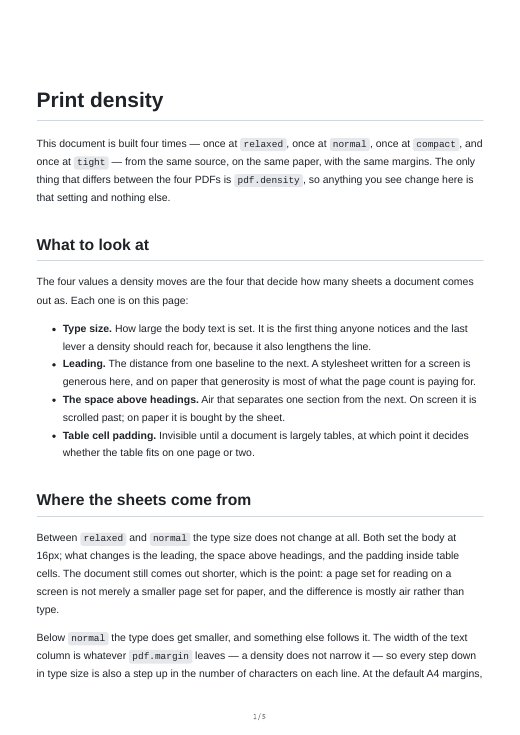
relaxed — 5 sheets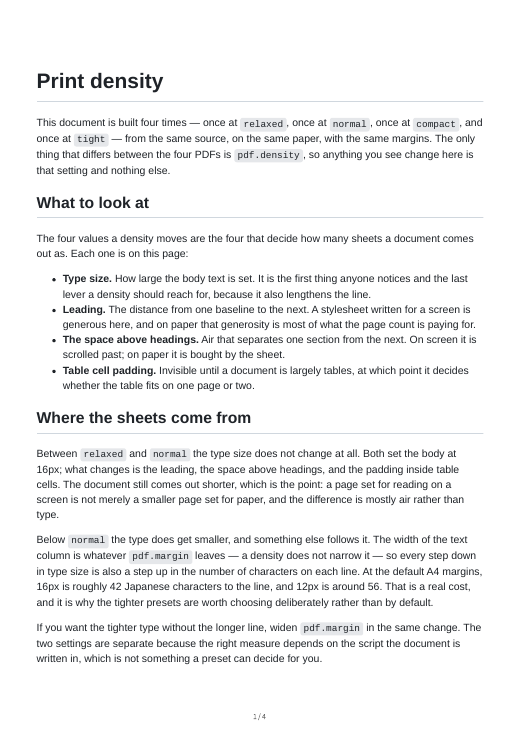
normal (default) — 4 sheets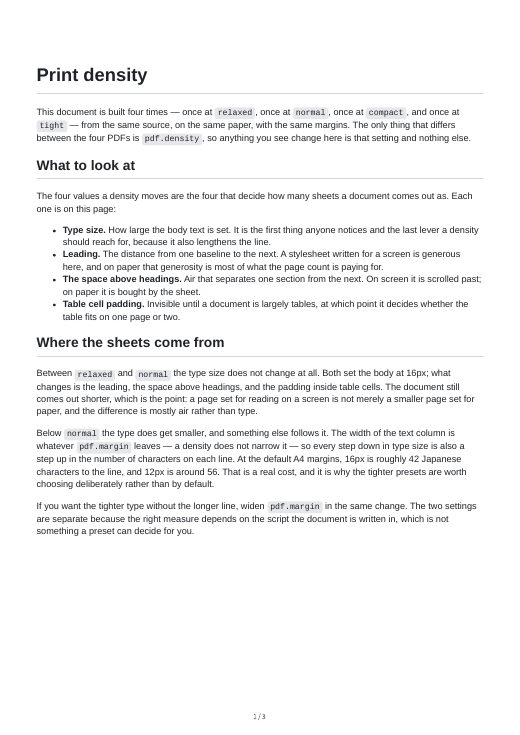
compact — 3 sheets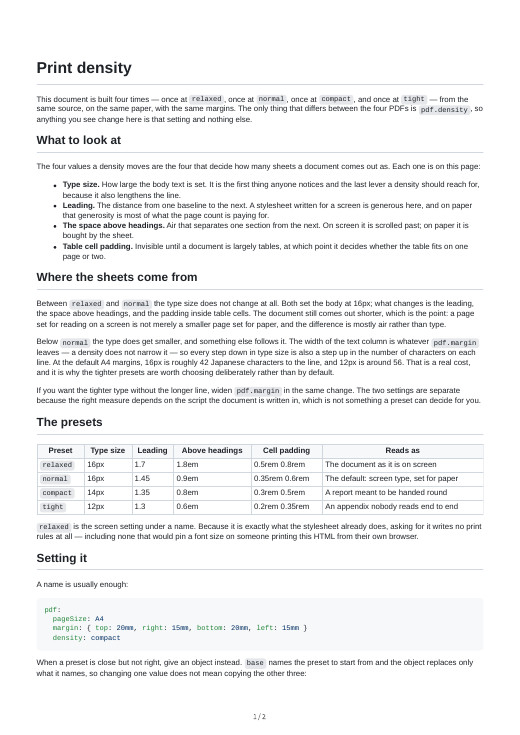
tight — 2 sheetsTIP
The sample document says what to look at on each page. Read one on paper before choosing: a density that looks fine at 100% on a screen can be hard to read at arm's length.
pdf.header / pdf.footer (page bands)
By default every page carries its number and the total, centred at the foot:
3 / 12It is digits and a separator only, so it needs no translation and does not change with lang.
Both keys take false to remove the band, or an HTML fragment to replace it:
pdf:
  header: '<div style="width:100%;font-size:8pt;text-align:right;margin:0 15pt"><span class="title"></span></div>'
  footer: false
The fragment is handed to Chromium, which substitutes into elements carrying its own classes: pageNumber, totalPages, title, date, url. There is no {{token}} syntax.
WARNING
- A fragment inherits none of the document's styles. Set the font and size yourself, as the examples do, or you get Chromium's unstyled default.
- The band lives in the margin. Chromium sizes it to the top and bottom margins, so nothing reflows, but a margin smaller than the band leaves the band against the paper edge. monodocs warns when the bottom margin is smaller than the default footer needs, measuring that footer rather than comparing against a fixed number. A replacement fragment is not checked, since whether arbitrary HTML and CSS fit cannot be judged from the margin value alone.
pdf.cover (cover)
Starts the PDF with a cover carrying the title, version, date, and authors.
title: Internal Documentation
document:
  version: "1.2"
  date: "2026-08-22"
  authors:
    - Documentation Team
pdf:
  cover:
enabled: true- The cover is generated, not written. It carries only the values of
titleanddocument, the same values the PDF's properties carry, so the two cannot disagree. Withoutdocument, the cover carries the title alone. - The layout is fixed and has no options. The title sits about a third of the way down the sheet, the version and date under it, and the authors at the foot. Paper size and margins are the body's.
- The cover is unnumbered, and the body starts at 1. Neither the default footer nor a replacement fragment is drawn on it, and the total page count leaves it out. The PDF viewer's page number box agrees with the print: the cover shows the
coverlabel (Coverby default), the body 1, 2, 3, and so on. - The bookmarks still point into the body. The cover is not added to them.
- HTML gets no cover. On screen, the same information is in the footer at the end, which
documentfills.
pdf.toc (a table of contents on paper)
Opens the printed document with a list of its sections and the sheet each one starts on:
pdf:
  toc:
    enabled: true
depth: 2 # h2 is listed under each page; 3 lists h3 as well- What it lists. The same tree as the sidebar and the bookmarks: each directory and page, and under each page its headings down to
depth. A directory shows the sheet of its first page. Withnumbering.sectionson, each line carries its section number. A page with no place in the sidebar is not listed, and neither is a heading inside a collapsed block (an AsciiDoc[%collapsible]example), which is not on the paper. Each line is a link to its section. - Where it goes. On sheets of its own, in front of the body and after the cover. Its sheets are part of the body, so they are numbered in the footer and the first page starts on the sheet after them. The heading is the
contentslabel (Contentsby default). - The numbers are read from the PDF, and checked. monodocs prints the document once with the number column empty, reads which sheet each section landed on, prints it again with the numbers in, then reads that final PDF once more and compares. The column has a fixed width in tabular figures, so filling it in does not rewrap a line and the second print settles. If it ever does not, monodocs prints again a bounded number of times, and a document that still disagrees fails the build (
pdf/toc-not-converged). A line whose section cannot be found in the page fails the build too (pdf/toc-unresolved). - It costs a second print, which is why it is off by default. For a document of about a hundred sheets in Japanese with client-mode Mermaid diagrams, the PDF build took about 2.1 s without the table and 3.1 s with it on a Linux workstation, and 3.9 s and 6.1 s on a GitHub-hosted Windows runner (different machines, so compare each pair, not the two platforms).
- PDF only. Printing the HTML from a browser does not add a table.
- No running headers (the current chapter at the top of every sheet): Chromium implements neither CSS
string-setnorstring(), and its header template substitutes only its fixed classes.
pdf.watermark (watermark)
Marks every sheet, for example as a draft or as confidential:
pdf:
watermark: "DRAFT"- One line of text, and nothing else to set. It is printed diagonally across the middle of every sheet, in a light grey that survives a photocopier, and sized so the line fits. It is blended into the page so it reads as behind the content (text and lines crossing it stay as dark as they were), and nothing covers it, neither a code block's background nor one a theme paints. There is no image, angle, font, opacity, or per-page control.
- Every printed sheet, and only printed ones. The PDF carries it on every sheet, the cover included, and so does the HTML when it is printed from a browser. It never appears on screen. Blending can only darken, so a browser print of the dark color scheme with background graphics on shows it barely, if at all.
- A theme cannot remove it. monodocs adds the rule to the stylesheet itself, so a theme that replaces
style.cssstill prints it, and its declarations are!important, so a print rule that hides generated content (*::after { display: none }) does not take it along. - Its text is font-checked.
fontCheckmeasures the watermark on the body's sheets and on the cover, so a script the build machine has no font for is reported. - The text is text. It is escaped into the stylesheet, so quotes, backslashes, or markup in the value appear as those characters. A line break or a blank value is refused.
pdf.pageBreakLevel (a sheet per section)
A source file already starts a new sheet. This also starts one before every heading down to the level you name, for documents whose sections must each begin on a new sheet:
pdf:
  pageBreakLevel: 2
2 is h2 only, 3 is h2 and h3, 6 is h2 through h6. false, the default, breaks before no heading. h1 is not a level here: it is the page title, and its file has already started a sheet.
A heading does not break when:
- nothing renders before it, or only the page title does. A page that opens with its title and goes straight into
## Sectionkeeps them together, while a title followed by an introduction does break before the section; - it is inside a block that must not be split: a table, a figure, a code block, an admonition, a blockquote;
- it comes straight after a manual page-break marker, which has already broken there (two forced breaks would leave a blank sheet).
A heading that starts a sheet sits at the top margin, without the space the density leaves above headings.
Page breaks
A source file always starts a new sheet; inside a file, a marker of your own starts one:
The last paragraph before the break.

<div class="page-break"></div>

The first paragraph of the new sheet.The last paragraph before the break.
<<<
The first paragraph of the new sheet.AsciiDoc's <<< is Asciidoctor's own page break. In Markdown the marker is the empty <div> common among Markdown-to-PDF tools (<div style="page-break-after: always"></div> is accepted as the same thing); an empty div renders as nothing where the source is read.
Markdown raw HTML is otherwise dropped. monodocs replaces the marker with an element it builds itself, so no attribute of yours reaches the output. Anything else (a second attribute, an extra class, text between the tags) is dropped like any other raw HTML rather than repaired.
Exactly what counts as the marker in Markdown (1.0 will freeze this):
- The element is a lowercase
div, and it carries exactly one attribute:class="page-break"orstyle="page-break-after: always". - Either quoting works:
"page-break"and'page-break'are the same marker. - In the
stylespelling the colon may be followed by spaces or tabs, or by nothing, and a trailing;is allowed —style="page-break-after:always;"is the same marker. Anything beyond that one declaration is not. - ASCII whitespace — space, tab, carriage return, line feed — is allowed around the
=, before the>, and around the marker itself, and at least one is required after<div. Nothing at all is allowed between>and</div>, not even a space. - Everything else is dropped:
<DIV>,class="page-break foo", a second attribute, a self-closing<div class="page-break"/>, a newline between the colon andalways, and any further declaration insidestyle.
Also:
- In Markdown, a marker must be a block of its own. One inside a blockquote, a list item, a table cell, or a heading is not recognised and is dropped: those are the blocks the print layout keeps together. In AsciiDoc the element lands wherever Asciidoctor puts
<<<, so keep<<<at the top level there too. - A marker with nothing after it leaves a blank sheet, and so do two markers in a row. That is how you ask for one.
The rule is @media print, so it applies to --format pdf and to a reader printing the HTML.
Page order and titles
The order of pages in the sidebar and in the prev/next navigation is independent of the display title. sidebar.titleFrom and sidebar.titleTransform only change the text shown on screen; they never affect ordering. The order is decided in two steps:
order(explicit, ascending) — the frontmatterorder(:sd-order:in AsciiDoc). Lower comes first.- Filename (path) order — pages without an
orderare sorted by their extension-stripped relative path (localeCompare). Pages that have anorderalways come first; pages without one fall to the end.
So even if 01_intro.md displays as “intro” via titleTransform: stripNumberPrefix, its position is decided by the filename that still contains 01_, not by the H1 heading. You can pin the order with a numeric prefix and clean up only the displayed text.
NOTE
Directory (sidebar folder) order follows the position of the first page inside it, i.e. filename order as well.
Page frontmatter
At the top of each page you can set the following — Markdown via YAML frontmatter, AsciiDoc via :sd-*: attributes. All are optional.
| Markdown frontmatter | AsciiDoc attribute | Type | Description |
|---|---|---|---|
title | :sd-title: | string | Explicit title. Always wins regardless of titleFrom / titleTransform, and is never transformed. |
order | :sd-order: | number | Sort order (ascending). Without it, pages fall back to filename order (pages that have an order come first). |
hidden | :sd-hidden: | boolean | Exclude from the sidebar, prev/next nav, and search. The page HTML is still generated and reachable via its hash route. |
description | :sd-description: | string | Page description (metadata). |
aliases | :sd-aliases: | string[] | Old hash routes this page still answers to. See below. |
---
title: Setup
order: 10
hidden: false
description: How to set up your environment
---
For AsciiDoc:
= Setup
:sd-order: 10
aliases (keeping an old link working)
Readers copy hash routes into chats, tickets, and other documents, and renaming a page silently breaks every copy: the reader who follows one lands on a document that looks fine and shows the wrong page. aliases keeps old routes working:
---
title: Installation
aliases:
  - /setup/install
  - /getting-started/install
---= Installation
:sd-aliases: /setup/install, /getting-started/installWhen a hash matches no page, the document looks it up among the aliases, replaces the hash with the current route, and renders the page, so the address bar then holds the working link. A route carrying an anchor (#/setup/install#configuration) keeps the anchor.
The rules are checked at build time:
- An alias is matched after every real route, so it can never shadow a page. If a page arrives at a route another page claims as an alias, the page wins and the alias warns that it has been shadowed.
- Two pages claiming the same alias is an error.
- An alias is normalised the way a route is (leading slash, no extension,
indexmeaning the directory), sosetup/install.md,/setup/install, andsetup/installare one alias, not three. - An alias appears in neither the sidebar, the search index, nor the previous/next order. A
hiddenpage keeps its aliases.
No alias is generated automatically (for example from the repository's history, which would make the output depend on the clone, such as a shallow CI checkout). An alias is a line you wrote.
See also
- Supported syntax — what is supported and what single-file bundling intentionally restricts.
- Roadmap — the version plan.